Pregnancy Tracker & Baby App
- 4.9
- Rating
- 5.00M
- Installs
- Free
- Price

 Analysis by App-foxy
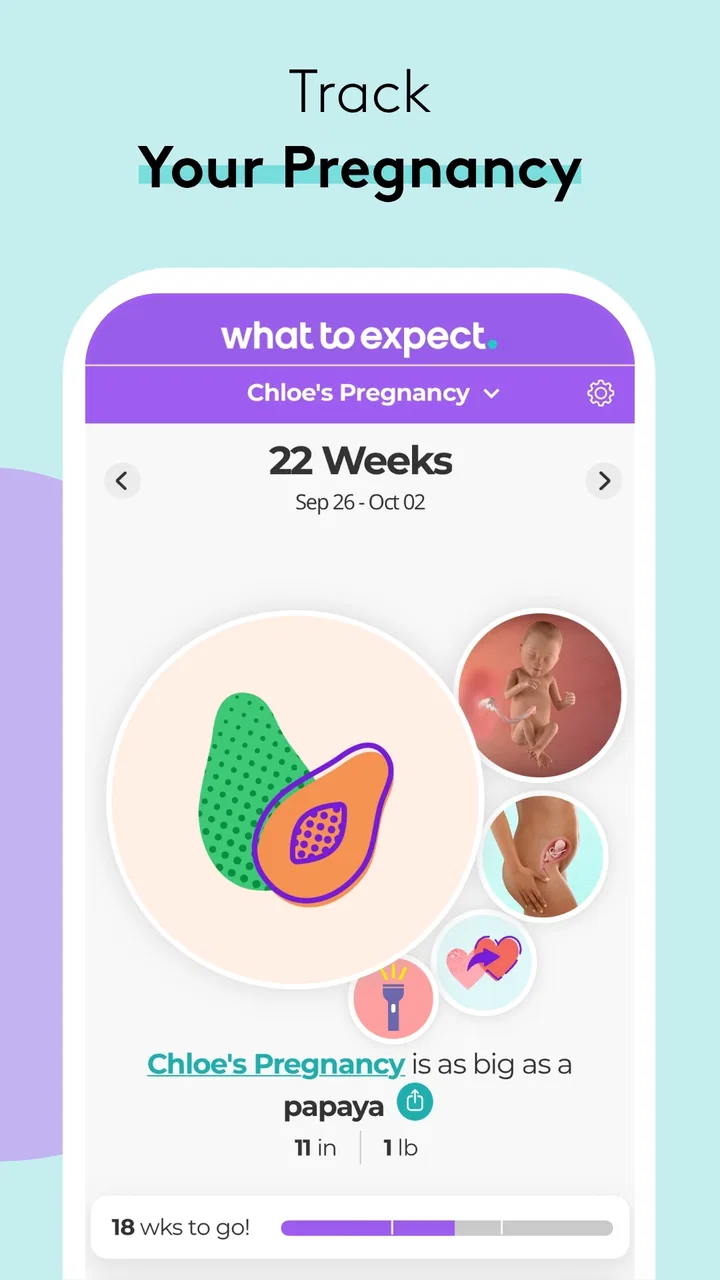
Pregnancy Tracker & Baby App is the kind of parenting app I would suggest when you want one calm place to follow a pregnancy instead of collecting several disconnected tools. Its strongest idea is not simply showing a countdown. It turns the pregnancy into a changing timeline, linking the baby’s milestones, growth stages, and practical parenting information so that each week feels easier to understand. I found that approach more useful than a bare calendar because it gives the current stage some context.
The app is free, belongs to the parenting category, and is developed by What to Expect. It has reached over 5 million installs, with a 4.9 average from around 119 thousand ratings and about 19 thousand written reviews. Those figures suggest that it has become a familiar choice for people looking for a pregnancy tracker, but popularity alone is not a reason to keep an app. What matters is whether its weekly guidance helps you make sense of what is happening without turning every small change into a source of worry.
Why the milestone timeline is the useful part
The central capability is the way the app organizes pregnancy around progress. Rather than asking you to search separately for fetal development, pregnancy timing, and early parenting ideas, it presents those subjects as parts of the same journey. In practice, that means I can open the app with a specific question—what stage am I in, what kind of development is being discussed, or what should I think about next—and remain inside the same flow.
You May Also Like

 Pandora - Music & Podcasts
Pandora’s Music Is Easy to Start, but Harder to Recover
Pandora’s strength is its low-effort path from a seed to a station. Its weak spot is how much confidence it asks you to place in connection, setup, and quiet recovery.

 8 Ball Pool
 Is Built on Rivalries, Rematches, and Routine
A close look at the rivalries, rematches, shared routines, and unanswered safety questions that turn a quick pool match into a persistent mobile community.

 Samsung Music
’s Quiet Strength Is Playing What You Already Own
Its reach comes less from spectacle than from dependable access to a personal library. That simplicity is both the app’s strongest retention engine and its ceiling.

 AccuWeather: Weather Radar
AccuWeather Review: A Quick, Clear Forecast for Everyday Decisions
For everyday plans, the best forecast is the one you can understand quickly. AccuWeather makes rain timing, radar, and local conditions easy to act on, with a few trade-offs.

 Hill Climb Racing
Why Hill Climb Racing Still Turns Crashes Into One More Run
A tiny car, a bumpy hill and one more upgrade: Hill Climb Racing keeps resurfacing because its simple chaos makes every near-miss feel personal.

 AliExpress - Shopping App
AliExpress Makes Global Shopping Feel Personal, but Shoppers Bear the Risk
AliExpress turns a global marketplace into a pocket-sized discovery engine. Its reach is useful, its shopping loop compelling, and its trade-offs easy to miss.
More From Our News Desk
View All News


That structure is especially helpful during the first pregnancy, when many terms are unfamiliar and the calendar can feel abstract. A week number by itself is not very meaningful. A week connected to a short explanation of development gives it a practical frame. I also like that the app is not limited to pregnancy dates; it continues the experience into baby milestones, growth stages, and parenting. That makes it feel less like a disposable countdown tool and more like a companion for a longer transition.
The real strength is context, not prediction. I would not use any pregnancy tracker as a substitute for a midwife, doctor, or other qualified professional. The app can help me prepare questions and understand general stages, but it cannot interpret my personal symptoms or decide whether something is medically urgent. Keeping that boundary in mind makes the timeline useful instead of misleading.
How the weekly information works in everyday use
When I use a tracker like this well, I do not try to read everything at once. I check the current stage, look at the milestone information, and save my attention for the parts that connect with my own situation. Pregnancy Tracker & Baby App works best with that light routine. A quick visit can give me a sense of where I am, while a longer session can help me think through upcoming parenting topics.
One practical tip is to treat the app as a question organizer. If a piece of information makes me curious about a symptom, appointment, test, or preparation task, I write the question down for my healthcare professional rather than trying to solve it through more searching. This avoids a common problem with pregnancy apps: reading several general explanations and becoming less certain than before.
A second useful habit is to share only the parts that are genuinely helpful with a partner or support person. The milestone view can give both people a common reference point, especially when one person is experiencing the physical side of pregnancy and the other is trying to understand how to help. I would avoid turning it into a daily reporting obligation, though. A tracker should reduce mental load, not create another routine that someone feels guilty about missing.
The app is available for devices running operating system version 10 or later, and its current version is 7.83. That matters if you are using an older phone or keeping an older device for privacy or battery reasons. I would check compatibility before planning to rely on it as the only pregnancy resource. For supported devices, the free price makes it easy to try without committing money first.
A realistic scenario: the Sunday planning check
Imagine being in the middle of a busy week, with work, appointments, and messages from family competing for attention. On Sunday evening, I could open the app, review the current pregnancy stage, read the milestone guidance, and note one or two questions for the next appointment. I might then look ahead at the parenting material to identify a topic worth discussing with my partner. That is a realistic use because it keeps the app in a supporting role rather than demanding constant attention.
For someone who is anxious, this slower routine is important. Checking every new sensation against an app can encourage unnecessary worry, particularly when general information is mistaken for a personal assessment. I would use the timeline at a planned time of day and close it when I have gathered what I need. The app is more valuable as a brief orientation tool than as an endless stream of reassurance.
It can also help when family members ask questions that are too broad to answer casually. Instead of trying to explain every stage from memory, I can use the current milestone as a starting point for a conversation. That does not make the app an authority, but it can make communication less vague and help relatives understand why certain kinds of support may be useful.
Where it compares well with simpler alternatives
A basic due-date calculator is faster if all I want is a date estimate. It is also less distracting. If that is my only goal, this app may feel larger than necessary. The advantage here appears when I want the date to lead into development and parenting context. The timeline gives me more to work with than a single number, while still keeping the pregnancy journey easy to follow.
Compared with a general search engine, the app offers a more organized starting point. Searching the web can produce valuable information, but it can also mix reliable medical guidance with personal stories, outdated pages, and alarming possibilities. A dedicated pregnancy app gives me a defined path. I still need professional advice for health decisions, but I spend less time sorting through unrelated results.
Compared with a symptom-focused app, Pregnancy Tracker & Baby App is better suited to broad preparation than to detailed symptom logging. That is a trade-off rather than a defect. People who want to record every symptom, medication, appointment, or measurement may prefer a specialized health journal or a tool recommended by their clinic. I would choose this app for stage awareness and parenting context, not as my complete medical record.
The trade-offs behind an all-in-one approach
Putting pregnancy tracking, baby milestones, growth stages, and parenting guidance together is convenient, but it can also make the experience feel busy. A person who wants a very quiet interface may prefer a simple calendar with minimal reading. The broader scope is valuable when I want continuity, yet it can become unnecessary if I only need a reminder of where I am in the pregnancy.
There is another emotional trade-off. Milestone content can be reassuring because it makes change feel understandable, but it may also make someone compare their experience too closely with a general timeline. Pregnancy does not unfold identically for everyone. I would read the material as a broad guide, not as a checklist that my body must follow perfectly.
The Teen content rating is worth noticing for households that share devices or for younger users who may be exploring pregnancy information. It does not change the app’s purpose, but it is a reminder to consider whether the tone and subject matter fit the person using it. Adults who want a strictly clinical resource may also find the parenting-oriented approach less precise than a provider’s materials.
Because the app is free, trying it is straightforward, but “free” does not automatically mean it will suit every preference. Some users may dislike spending time inside a general-purpose parenting app when their clinic already provides a trusted patient portal and educational material. In that situation, the app may be a convenient supplement, but I would not duplicate every instruction across both systems. Keeping one source for appointments and medical decisions helps prevent confusion.
Who benefits most from the milestone workflow
I think first-time parents gain the most. The app gives unfamiliar stages a readable sequence and connects pregnancy information with the parenting period that follows. That continuity can make the transition feel less like a series of isolated questions. It is also useful for partners and relatives who want to be supportive but do not know what information is relevant at a particular point.
People who like gentle structure should also enjoy it. The app gives me a reason to check in without requiring a complicated planning system. A weekly review, a short note for the next appointment, and a conversation with a partner can turn the timeline into a practical tool. The value comes from using the information selectively, not from consuming every available piece of content.
It is less suitable for someone who wants only clinical instructions, a detailed medical log, or a completely minimal countdown. In those cases, a healthcare provider’s resources, a specialized record-keeping app, or a simple calendar may be a better fit. I would also skip relying on it alone if I am looking for answers about urgent symptoms or personal treatment decisions.
Connectivity, interruptions, and a sensible routine
Because the experience brings together milestone information and parenting guidance, I would plan to use it when my phone has a reliable connection rather than assume every part will be available in every situation. That matters during travel, in a clinic waiting room with poor reception, or when I am trying to check something quickly between tasks. If a page does not load as expected, I would avoid repeatedly tapping through while distracted; I can return to the topic later and keep any time-sensitive health question for my care team.
For a data-conscious routine, I would make the main visit at home or another familiar point in the day, then jot down the few reminders or questions I actually need. That approach keeps the app from becoming something I reach for every time a new concern crosses my mind. It also makes the weekly timeline more useful: I arrive with a clear purpose, take away a practical note, and close it instead of browsing until a general article starts to feel like personal advice.
This connected, content-led format suits someone who wants a guided path more than someone who expects a tiny offline reference card. If quick access in places with weak service is central to your routine, a paper appointment note or your clinic’s own materials can be a better backup. I see the app as a useful companion when it is convenient to open, not as the only place to keep important health information.
My final view after using it as a companion
Pregnancy Tracker & Baby App succeeds because it makes pregnancy progress feel connected to real preparation. Its milestone timeline is the feature that gives the rest of the experience purpose: I can see where I am, understand the general stage, and use that understanding to prepare a question or conversation. The move from pregnancy into baby milestones and parenting also gives the app more lasting value than a countdown that becomes irrelevant after delivery.
My recommendation is to use it deliberately. Check the current stage, take the information that helps, and keep medical decisions with qualified professionals. If you want a free, broad parenting companion rather than a clinical record or a bare date calculator, this is an appealing choice. With a Teen content rating, support for operating system version 10 and later, and a current version of 7.83, it is worth trying on a compatible device—especially for a first pregnancy where organized context can make an unfamiliar journey easier to follow.
After its release on October 26, 2010, the app has had plenty of time to become a recognizable name in this space. My honest takeaway is that its best use is not constant checking. It is the short, purposeful visit that turns a pregnancy week into something I can understand, discuss, and prepare for without pretending that an app can replace personal care.
FAQs for Pregnancy Tracker & Baby App
01What features does the Pregnancy Tracker & Baby App offer?
The Pregnancy Tracker & Baby App provides a comprehensive suite of features, including weekly updates on fetal development, personalized health tips, appointment reminders, and a contraction timer. Additionally, it offers a community forum for connecting with other expectant parents and expert articles on pregnancy, childbirth, and early parenting.
02Is the Pregnancy Tracker & Baby App available for both Android and iOS?
Yes, the Pregnancy Tracker & Baby App is available for download on both Android and iOS platforms. Users can easily find it on the Google Play Store and the Apple App Store. The app is designed to be user-friendly and functions seamlessly across different devices and operating systems.
03Does the app require internet access to function?
While many features of the Pregnancy Tracker & Baby App can be accessed offline, such as the calendar and personal notes, an internet connection is required for features like community forums, expert article updates, and syncing data across devices. To fully utilize all functionalities, periodic internet access is recommended.
04How does the app ensure the privacy of my personal information?
The Pregnancy Tracker & Baby App takes user privacy seriously and incorporates robust security measures. It complies with standard data protection regulations, ensuring that personal information is encrypted and stored securely. Users are encouraged to review the app’s privacy policy for detailed information on data handling practices.
05Is the Pregnancy Tracker & Baby App free to use?
The app offers a free version with essential features, but there is also a premium subscription available. The premium version includes additional features, such as personalized health insights, ad-free browsing, and exclusive content. Users can choose the version that best fits their needs and budget.
Pros
- Comprehensive weekly pregnancy updates.
- Customizable reminders for appointments.
- User-friendly interface with intuitive design.
- Includes community forums for support.
- Tracks baby's growth with detailed visuals.
Cons
- Contains ads that can be intrusive.
- Some features require in-app purchases.
- Limited personalization options.
- Lacks integration with wearable devices.
- Occasional syncing issues reported.

Pregnancy Tracker & Baby App
Gallery